
Home » Register

DARAZPLAY Register: Create Your Account Fast on Mobile
Start Your DARAZPLAY Register Journey With Quick Mobile Steps and Clear Requirements
DARAZPLAY register is built for quick mobile onboarding. Join with your phone number, confirm by OTP, and access your account instantly. The DARAZPLAY official site keeps the flow simple from form to first login. Use your real name and date of birth so payments match your wallet details without delays. Most new members check cricket first, then explore slots like JILI.
For a safe start on your phone, open the DARAZPLAY Main Site. Check the padlock icon, use a stable data connection, and keep your wallet info nearby. You can finish sign-up now and complete any extra verification through support if requested.
Why creating a DARAZPLAY account adds value from day one on mobile
Registration unlocks faster access, local payment options, and tools that fit how you play on mobile.
Quicker access with saved preferences on every device you use
Your settings, favorites, and recent searches carry over after you create your account. Open the app or site and continue right where you left off.
Cricket-first markets, score widgets, and timely match insights
Get a clean view of cricket fixtures, odds ranges, and live updates. Pin your teams and receive alerts that fit your data budget.
Responsive support with verified details for faster resolutions
Verified profile data helps agents resolve issues quickly. Expect clear guidance via live chat and email during busy match hours.
Access to JILI slots and quick arcade-style games
Registration lets you try JILI titles and other quick-play lobbies. Preview volatility, min bets, and recent wins before you start.
Trusted local payment choices aligned with your account name
Name and date-of-birth matching reduce payout holds. Set your default wallet once and use it for faster withdrawals next time.
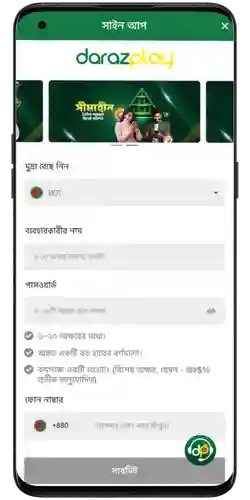
How to sign up on mobile in minutes with OTP and profile checks
- Tap Register from the header or bottom menu. Choose your language and confirm BDT as your currency.
- Enter your mobile number. You will receive an SMS OTP. Type the code to verify ownership in seconds.
- Create a strong password and set a 4-digit withdrawal PIN. Avoid repeating digits or personal dates.
- Add your full name exactly as it appears on your wallet or bank. Enter your date of birth. Add a referral or bonus code if you have one.
- Agree to the terms and submit. You will see a confirmation screen and be taken to your new profile.
- On first login, choose your preferred payment method and enable two-step verification. Many users link bKash or Nagad for quick deposits. Explore cricket hubs or open JILI games next.
Smart account setup tips for strong security, profile matching, and payouts
- Use your legal name and the same mobile number used on your wallet to avoid payout delays.
- Set a unique password with a mix of letters, numbers, and symbols. Do not reuse old passwords.
- Enable two-step verification by SMS or email for stronger protection.
- Create a 4-digit withdrawal PIN and store it in a secure password manager.
- Set your default payment method once and keep it consistent with your profile details.
- Turn on notifications for deposit updates, payout status, and match alerts you actually want.
- Keep a clear photo of your ID ready. If asked for KYC, good images speed up approval.
Advantages after registration, including games, bonuses, fast payments, and personal tools
Registration gives you more than access. It personalizes your home screen, speeds up payments, and highlights what you actually watch and play.
Cricket-first view and smart tools built around your habits
Pin series, set odds thresholds, and follow price moves during big fixtures. The interface loads cleanly for mobile so data use stays low.
If you prefer the app experience, tap DARAZPLAY App Download to install. The app keeps you signed in, reduces data overhead, and supports quick actions with fewer taps.
Bonuses and promotions that match how you actually play
Check current offers with clear wagering notes and expiry dates. Visit DARAZPLAY Promotions for welcome deals and recurring rewards that suit cricket and JILI sessions.
Payments move faster after your first verified payout. Save your preferred wallet, and future withdrawals will require fewer checks and less waiting.
New member questions answered about opening, verifying, and managing your account
What do I need to create a DARAZPLAY account?
A mobile number for OTP, your full legal name, and date of birth. Keep your wallet details ready so names match during payouts.
Is phone verification required during sign up?
Yes. OTP confirms you control the number. It protects your account and speeds up future recovery if you change devices.
Can I change my phone number after registration?
Yes. Update the number in Settings and confirm with a new OTP. Support may request ID if the previous number is inactive.
How fast are withdrawals for a new account?
First payouts may take longer while checks run. After a verified payout, timing improves when you use the same wallet and details.
Where do I log in after I open my account?
Use the site header or the app to find DARAZPLAY login. Save your username, enable two-step verification, and keep your PIN private.
Ready to register your account and start using the tools built for you
Create DARAZPLAY account now to set your preferences, follow cricket with smarter alerts, and access JILI and more. Registration takes minutes on mobile.
Start your DARAZPLAY sign up today and build confidence early. Verify by OTP, keep your details consistent, and enjoy a clean path from deposit to payout.